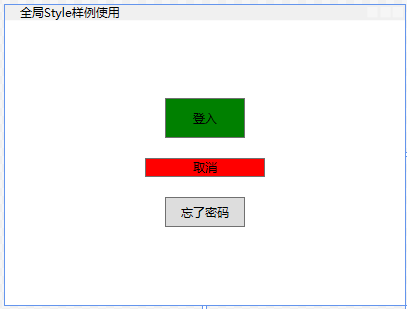
1、新建一个资源词典ButtonStyle.xaml
<ResourceDictionary xmlns="http://schemas.microsoft.com/winfx/2006/xaml/presentation"
                    xmlns:x="http://schemas.microsoft.com/winfx/2006/xaml">

    <!--Button 的全局默认样式-->
    <Style TargetType="Button">
        <Setter Property="Margin" Value="20"/>
        <Setter Property="Width" Value="80"/>
        <Setter Property="Height" Value="30"/>
    </Style>

    <!--继承:通过BasedOn="{StaticResource {x:Type Button}}继承"-->
    <Style x:Key="LoginStyle" TargetType="Button" BasedOn="{StaticResource {x:Type Button}}">
        <Setter Property="Background" Value="Green"/>
        <!--重写父样式的值,如果没有写就是父样式的值30-->
        <Setter Property="Height" Value="40"/>
    </Style>

    <!--普通样式,没有继承-->
    <Style x:Key="CancelStyle" TargetType="Button">
        <Setter Property="Background" Value="Red"/>
    </Style>

</ResourceDictionary>
2、App.xaml引用资源词典ButtonStyle.xaml
<Application x:Class="WpfApp1.App"
             xmlns="http://schemas.microsoft.com/winfx/2006/xaml/presentation"
             xmlns:x="http://schemas.microsoft.com/winfx/2006/xaml"
             xmlns:local="clr-namespace:WpfApp1"
             StartupUri="MainWindow.xaml">

    <!--定义了整个应用程序级别的全局资源-->
    <Application.Resources>
        <!--资源字典容器-->
        <ResourceDictionary>
            <!--资源字典的合并-->
            <ResourceDictionary.MergedDictionaries>
                <!--/WpfApp1 程序集名,如果是同一程序集,可以略不写,如果是引用其它库,必须写上-->
                <!--;component固定分隔符:是 WPF 的约定,用于标识这个资源是「程序集内部的嵌入式资源」,而非外部文件系统中的文件。-->
                <!--/ButtonStyle.xaml资源文件在项目中的相对路径:- 如果文件直接放在项目根目录,就是/ButtonStyle.xaml;- 如果文件放在Styles子文件夹中,就是/Styles/ButtonStyle.xaml;- 路径中的/表示项目的根目录。-->
                <ResourceDictionary Source="/WpfApp1 ;component/ButtonStyle.xaml"/>
            </ResourceDictionary.MergedDictionaries>
        </ResourceDictionary>
    </Application.Resources>
</Application>
3、使用样式
<Window x:Class="WpfApp1.MainWindow"
        xmlns="http://schemas.microsoft.com/winfx/2006/xaml/presentation"
        xmlns:x="http://schemas.microsoft.com/winfx/2006/xaml"
        xmlns:materialDesign="http://materialdesigninxaml.net/winfx/xaml/themes"
        Title="全局Style样例使用" Height="300" Width="400">

        <StackPanel HorizontalAlignment="Center" VerticalAlignment="Center" >
        <Button Style="{StaticResource LoginStyle}" Content="登入"/>
        <Button Style="{StaticResource CancelStyle}" Content="取消"/>
        <Button Content="忘了密码"/>
    </StackPanel>

</Window>
本文来自 www.luofenming.com